fish-style abbreviations for PowerShell
After getting the prompt sorted, the next thing I missed on Windows was fish abbreviations.
fish abbr expands a short
word into the full command, right in the buffer, before it runs. Type ggp, hit
space, and it becomes git push. Unlike an alias, you see the real command and
can edit it before pressing enter.
PowerShell has no abbr, but PSReadLine lets you bind keys. So I rebuilt
it.
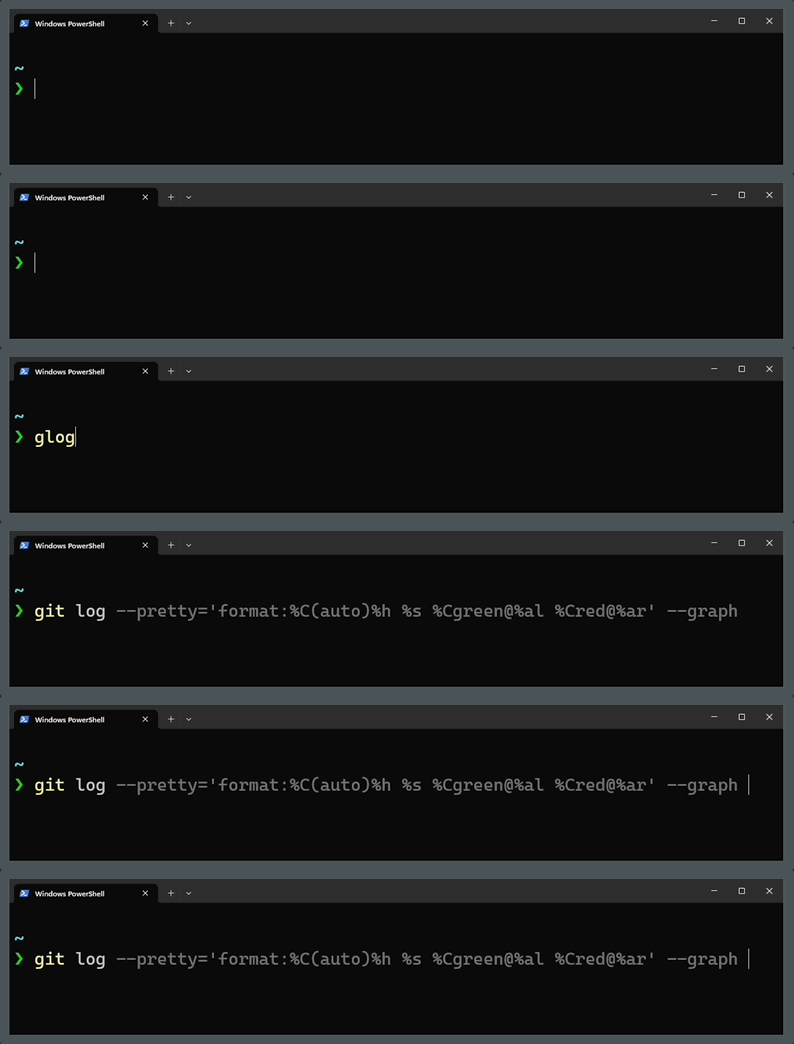
glog expanded inline: pretty git log
The abbreviations
Open your profile:
code $PROFILEDefine the abbreviations in a hashtable:
$global:abbrs = @{ ag = 'rg -S' g = 'lazygit' ggl = 'git pull' ggp = 'git push' e = 'code' glog = "git log --pretty='format:%C(auto)%h %s %Cgreen@%al %Cred@%ar' --graph"}Expand on space
Bind spacebar. If the word before the cursor is an abbreviation, replace it.
Then insert the space as usual, so you keep typing or editing:
# Expand on Space (editable before you run)Set-PSReadLineKeyHandler -Key Spacebar -ScriptBlock { $line = $null; $cursor = $null [Microsoft.PowerShell.PSConsoleReadLine]::GetBufferState([ref]$line, [ref]$cursor) if ($line.Substring(0, $cursor) -match '^\s*(\S+)$' -and $abbrs.ContainsKey($matches[1])) { [Microsoft.PowerShell.PSConsoleReadLine]::Replace( $cursor - $matches[1].Length, $matches[1].Length, $abbrs[$matches[1]]) } [Microsoft.PowerShell.PSConsoleReadLine]::Insert(' ')}Expand on enter
Same idea on enter, for when the whole line is just the abbreviation.
ValidateAndAcceptLine expands it, runs the line, and keeps multi-line handling
intact:
# Expand on Enter, then run (ValidateAndAcceptLine keeps proper multi-line handling)Set-PSReadLineKeyHandler -Key Enter -ScriptBlock { $line = $null; $cursor = $null [Microsoft.PowerShell.PSConsoleReadLine]::GetBufferState([ref]$line, [ref]$cursor) if ($line -match '^\s*(\S+)' -and $abbrs.ContainsKey($matches[1])) { [Microsoft.PowerShell.PSConsoleReadLine]::Replace(0, $matches[1].Length, $abbrs[$matches[1]]) } [Microsoft.PowerShell.PSConsoleReadLine]::ValidateAndAcceptLine()}Reload the profile and the abbreviations expand as you type:
. $PROFILENot quite fish, but close enough that my muscle memory works on Windows now.
P.S. I have since
retired ag on my Mac. That is
where the ag = 'rg -S' entry above comes from. It expands here too.