keep an AVD session awake with f15
Some of my work happens on a Windows box, reached over remote desktop from my Mac. Inside that AVD (Azure Virtual Desktop) session I start the slow things and walk away: a download and restore of a large database, or a Claude loop grinding through a stack of issues.
One lunchtime I came back to find the database job gone.
(╯°□°)╯︵ ┻━┻
Or as we say… FFFFFUUUUUUUU-
AVD had signed me out for sitting idle, and the work died with the session. It kept happening. The long jobs I run in the background all need the session to stay alive while I am not touching it.
PowerToys Awake is the obvious tool. It keeps a Windows machine awake. I tried it. It did not help. AVD does not sign me out for sleeping. It signs me out for not typing, and Awake never types anything.
the key that does nothing
So I needed input to keep arriving while I was away, doing nothing when it
landed. Turns out there is a key for exactly that: f15.
f15 is a real key. It has its own virtual-key code,
VK_F15
(0x7E), and
SendKeys
sends it as {F15}. But nothing on my machine reacts to it. There is no f15
button on my keyboard, and no app I run has it bound to anything. So I can press
it on a loop, and the only thing that happens is the session stops counting me
as gone.
The whole keep-alive is a COM object and a loop:
# keep-active-5h.ps1$intervalSeconds = 120$runHours = 5$wsh = New-Object -ComObject WScript.Shell$deadline = (Get-Date).AddHours($runHours)while ((Get-Date) -lt $deadline) { # f15 is a key that does nothing, press it every 2 minutes. $wsh.SendKeys('{F15}') Start-Sleep -Seconds $intervalSeconds}It worked. But it ran blind. Five hours was baked in, and I had no idea how much time was left without doing the math.
a param and a countdown
I came up through Unix. PowerShell is not a language I think in. The COM object and the loop I could manage. A parameter with a sane default, and a countdown that rewrites itself in place, I could not. So I woke Claude and asked her:
keep-active-5h.ps1 i want it to take a param for the time, and default to 2h. also, is it possible, in powershell to show a timer going down, on how long remains. updating chars in place?
She came back with this. One parameter, defaulting to two hours, and a status line that overwrites itself instead of scrolling:
# keep-active.ps1: keep an AVD session alive by sending the no-op {F15} key.## Usage:# .\keep-active.ps1 (default 2 hours)# .\keep-active.ps1 0.5 (30 min)# .\keep-active.ps1 5 (5 hours)## Stop early with ctrl+c.## Keep the AVD session CONNECTED while this runs.param([double]$Hours = 2)$IntervalSeconds = 120$deadline = (Get-Date).AddHours($Hours)$wsh = New-Object -ComObject WScript.ShellWrite-Host ( "Keeping active until {0:HH:mm:ss}. ctrl+c to stop." -f $deadline)$i = 0while ((Get-Date) -lt $deadline) { # tick every second for the countdown, but only press the key every 2 minutes if ($i % $IntervalSeconds -eq 0) { $wsh.SendKeys('{F15}') } Write-Host ( # `r jumps to column 0, so each second overwrites the line instead of scrolling "`rTime remaining: {0:hh\:mm\:ss}" -f ($deadline - (Get-Date)) ) -NoNewline Start-Sleep -Seconds 1 $i++}Write-Host "`nDone."I run it from a PowerShell window inside the session. ctrl+c stops it early:
.\keep-active.ps1 # default two hours.\keep-active.ps1 5 # five hoursthe other machine
f15 only helps while the session stays connected. The keystroke goes to the
AVD session, so the session has to be there to catch it. If my Mac dozed off
while I was at lunch, the remote desktop link dropped, the session went
disconnected, and a disconnected session got signed out the same as an idle one.
The job died anyway, and f15 never got its chance.
So the Windows trick needed a Mac-side partner. I lock my Mac when I leave for lunch, which only turns the display off:
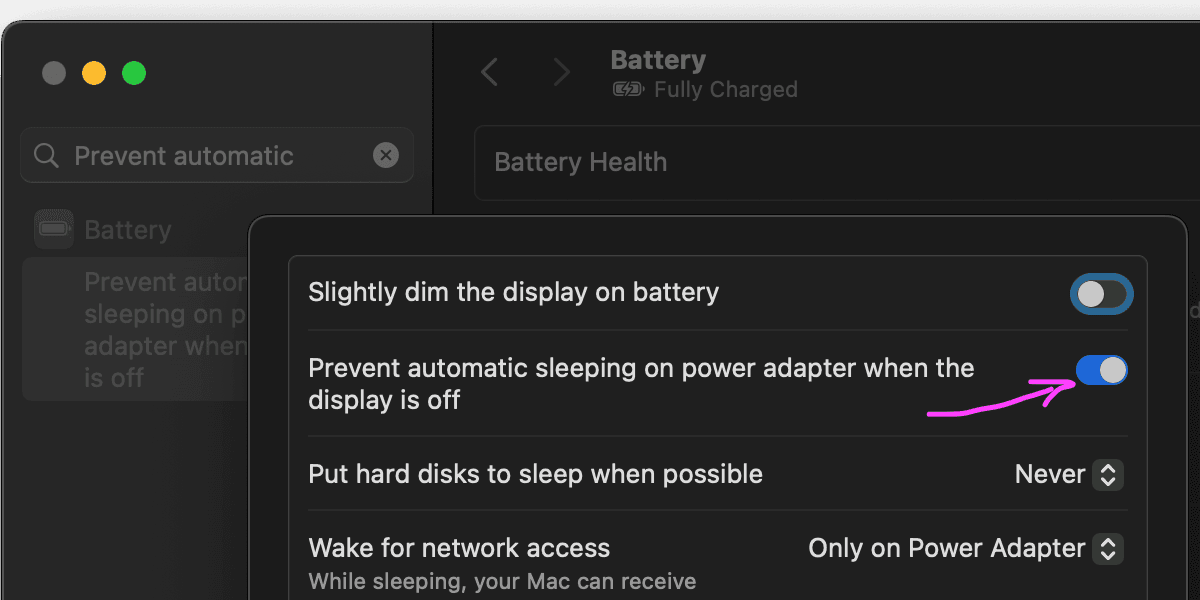
System Settings → Battery → Options. With this on, the Mac stays up and the remote desktop link holds while I am away from the keyboard.
Two machines, two ways of nodding off. f15 keeps the far one busy. The Battery
toggle keeps the near one awake. Both have to hold for the job to outlast lunch
with a locked screen.