save the Chrome console to a file
A web app I work on sometimes shows errors in the morning after sitting open
overnight. The bug is hard to reproduce on demand, so the console full of errors
is the evidence, and I wanted to keep it. Until now I selected everything and
copied it, or used the console’s
copy()
helper on a single logged object.
Turns out the console’s context menu can save the whole thing. Right-click anywhere in the messages and pick “Save as…”. The Console reference describes it as:
Save as…: Save all current messages to a plaintext
.logfile.
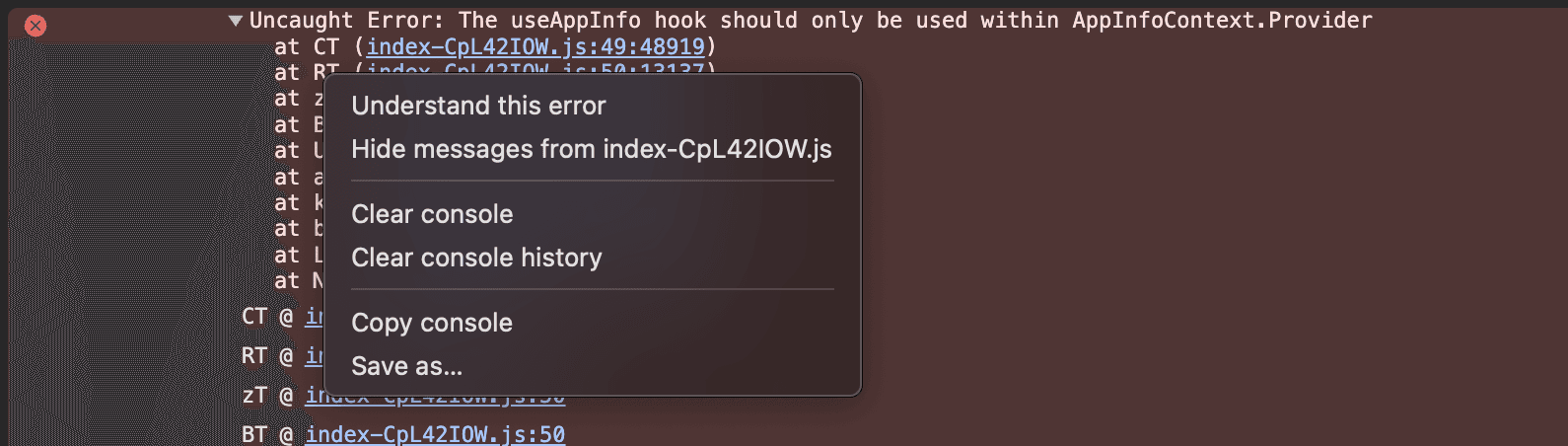
Right-click the console → Save as…
The file holds all 958 lines of my console session, stack traces written out in full:
14:42:11.981 Helpdesk:1 An iframe which has both allow-scripts and allow-same-origin for its sandbox attribute can escape its sandboxing....16:36:00.960 index-CpL42IOW.js:49 Uncaught Error: The useAppInfo hook should only be used within AppInfoContext.Provider at CT (index-CpL42IOW.js:49:48919) at RT (index-CpL42IOW.js:50:13137) ...Every line carries a timestamp, even though my console was not displaying them. The page loaded at 14:42. The uncaught error fired at 16:36, two hours later, while the tab just sat there. My select-and-copy routine never told me that.
I dropped the file into a Claude session together with the macOS system logs from the same afternoon. She found the correlation for me: the error shows up when the machine wakes from sleep.